Sign in to Xoyondo with Google

We have some practical news to share: you can now log in to Xoyondo using your Google account.

While we’ve always tried to keep our scheduling process as lightweight as possible, we know that managing separate passwords and waiting for verification emails can be a hassle. This update is designed to remove those small points of friction.

How it Works

The process is straightforward. On the login or sign-up page, you’ll now see a “Continue with Google” button.

  • For New Users: You can create an account instantly. Since Google has already verified your identity, you won’t need to wait for a verification email from us to get started.
  • For Existing Users: If you already have a Xoyondo account, you can use the Google login immediately. As long as your Google email matches the email address on your existing Xoyondo account, the system will link them automatically. You’ll be taken straight to your current dashboard. Logging in with Google won’t create a new account for you.

Of course, the traditional way of signing in with an email and a unique password remains fully supported. We aren’t removing any options; we’re just adding a faster one.

Why Create an Account?

Many people use Xoyondo as “guests” for one-off polls, which works great for quick planning. However, as you start managing more events, things can get cluttered. Having an account (and using the new Google login to access it) offers a few key benefits:

  • The Dashboard: All the polls you’ve created or participated in are gathered in one central location.
  • No Lost Links: You don’t have to dig through your email inbox or chat history to find a specific link to a poll. If you’re logged in, it’s already on your dashboard.
  • Administrative Control: It’s much easier to edit, close, or delete your polls when they are all tied to a single account.

Our goal is to make the administrative side of scheduling get out of your way so you can focus on the actual event. We hope this small change makes your experience a little smoother.

Major update

We have updated Xoyondo to a new version. Here are some of the changes:

  • The poll pages are now wider, to make more space for large polls
  • The poll admin area has been redesigned with a left sidebar for the general options
  • On desktop, the poll header column (with suggested dates and times) is now always visible. This makes it easier to participate in polls with many participants
  • Overall design changes (including updated header and logo)
  • Simplified email notifications. If participants sign up for notifications they are notified about new votes and new comments
  • Improved setup of anonymous polls and opinion polls. All the polls you create in the initial setup are now always visible (no need to switch between polls anymore). Furthermore, polls can now be easily copied
  • Many internal improvements to speed up the website

Do you like the changes? Please let us know. We always try to make Xoyondo better.

Please review us on Capterra:
https://review.capterra.com/SS-xoyondo-141266-3407631917
The first 100 users who submit a review will receive a $10 gift card!

Improved email notifications

Dear Xoyondo-users,

if you subscribed to email notifications about new entries in polls or new comments, you received so far an email for every new entry. This could lead to numerous emails for polls with many participants.

In order to reduce the number of notifications you will from now on receive only one email even if there are multiple new entries until you visit the poll via the link in the notification email.

We hope that this makes the scheduling process even more comfortable for you.

Your xoyondo.com team

Improved administration area

Dear xoyondo user,

We have redesigned the administration area for polls. You can now adjust the settings of your polls in a more flexible and direct way.

General settings can be modified in the two panels (see next picture) at the top of the admin area. Here you can, e.g., change your name or activate/deactivate comments. Furthermore you can add or edit other types of polls.

admin area panel

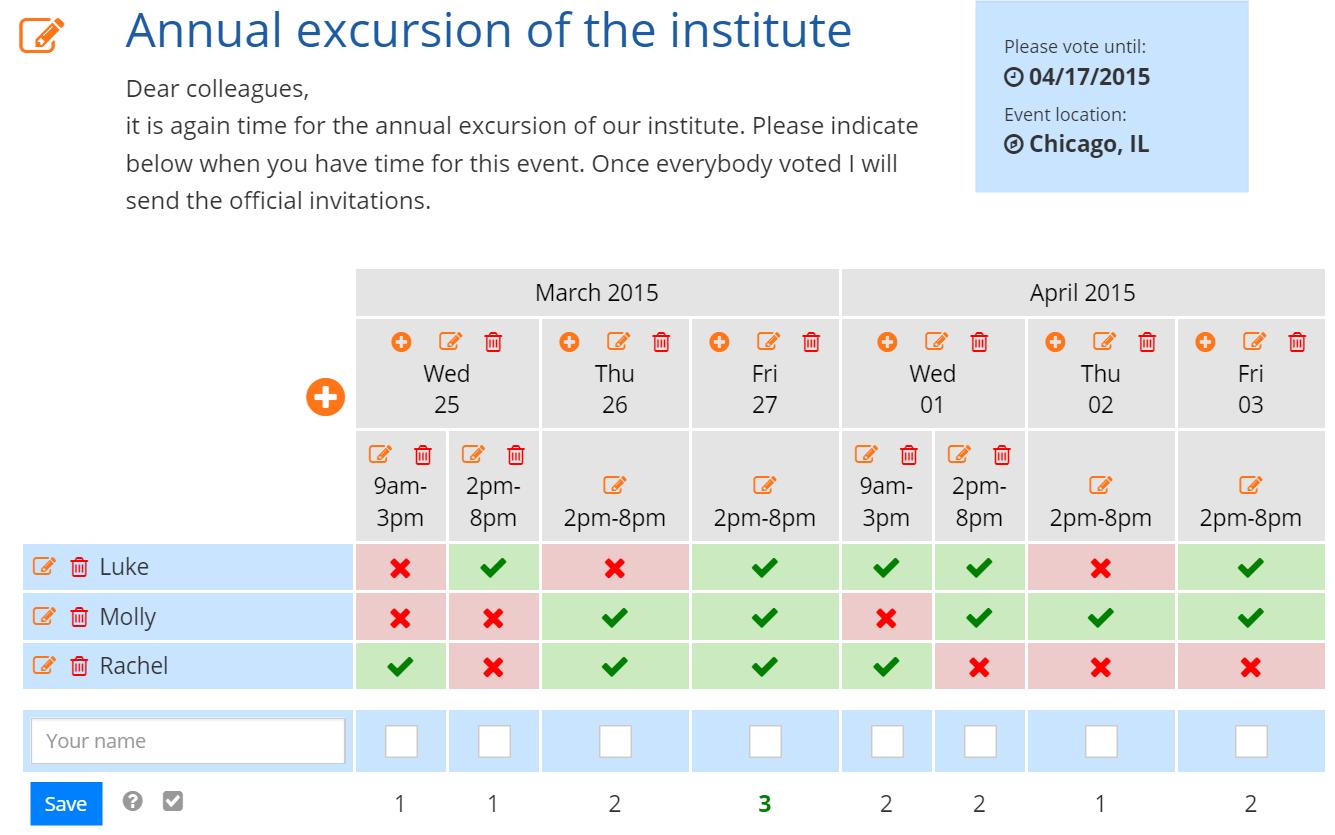
Settings of date- or opinion polls can now be directly modified within the poll. Information like title, description, expiration date or event location can be modified by clicking on the orange ‘edit’-button next to the title. In the poll table you will now find different buttons in order to:

  • add dates (large ‘plus’-symbol to the left)
  • add times for certain dates (small ‘plus’-symbol in the corresponding date cell)
  • edit dates (small ‘edit’-symbol in the corresponding date cell)
  • delete dates (small ‘trash’-symbol in the corresponding date cell)
  • edit times (small ‘edit’-symbol in the corresponding times cell)
  • delete times (small ‘trash’-symbol in the corresponding times cell)

Note: If you add a date or a time, a question mark will be displayed to existing participants for the new date or time. The present votes will not be affected.

admin area poll
We hope that you like the new administration area and that this will further simplify your scheduling tasks. If you have further suggestions we would be happy if you contact us via email, Facebook, Twitter or just leave a comment on this page.

Schedule meetings the easy way!

Schedule meetings

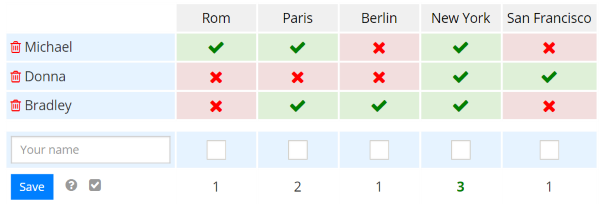
With xoyondo you can schedule events and meetings without sending around dozens of emails. Just pick suitable dates and send the link to your personal poll website to every participants of your event. Each participant now can indicate suitable times so that you can easily determine the best date for you event.

Example of a date poll

Obtain an opinion

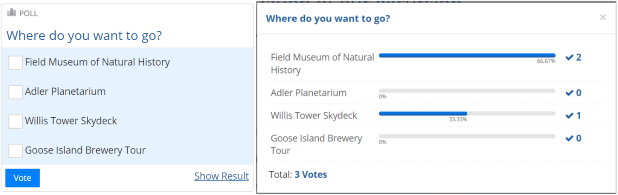
You are not looking for a certain date but instead for the opinion of your participants about a certain topic? No problem! Set up an opinion poll with xoyondo.

opoll_blog_sm

Conduct a survey

You just want to set up anonymous polls? Also this is possible with xoyondo.

apoll_blog

xoyondo originated from a project that we started (under a different name) already in 2006. This year we decided to relaunch this project with a completely rewritten code. We are eager to further improve xoyondo. Help us with your feedback and contact us via email, Facebook, Twitter or Google+. We are grateful for your suggestions!

Stay organized!

xoyondo.com